

Introducing Backlink Tracker
Backlink Tracker gives Shipstry makers one place to choose directories, track each submission by product, record listing URLs, and follow up before work gets lost in a spreadsheet.

I like a good spreadsheet. I do not like opening one three weeks after a launch and trying to remember whether I submitted a product, saved the listing URL somewhere else, or meant to follow up on Friday.
That was the problem behind Backlink Tracker.
Shipstry already had a Backlink Directory: a reviewed list of places where makers can submit a product. It helped with the first question, which is usually "where should I try?" The next questions were messier:
- Which directories have I picked for this product?
- Did I send the submission, or only mean to?
- Where is the live listing?
- Which ones need a follow-up?
The directory answered none of that. The work moved to a spreadsheet, Notion, browser bookmarks, or whatever was open on launch day.
Backlink Tracker keeps that work next to the directory.
It is a tracker, not an automatic submission service
The name matters. Backlink Tracker does not submit products for you, promise an approval, or report imaginary SEO gains. Each directory has its own form, review process, and rules. You still decide whether it is worth your time and submit where you want to submit.
What the tracker does is keep the operational part from falling apart afterwards. It records what you chose, where each submission stands, and what you need to do next.
It is included with Backlink Directory access and works per product. Pick one of your Shipstry products, then build its own queue. A directory that makes sense for one product may be a poor fit for another, so I did not want one anonymous list shared across everything you have made.
Start in Discover
Discover is where you decide which directories belong in a product's queue.
The directory data is still there: authority, cost, link type, estimated difficulty, traffic signal, and the notes attached to each listing. You can search and filter instead of opening ten tabs to compare candidates. The tracker also shows whether a directory is untouched or already in motion for the selected product.
When a directory looks worth trying, add it to the queue. Its first status is Planned.
That small distinction is useful. A directory you have glanced at is not the same as one you have committed to submit. I kept finding that my old lists mixed those two things together, then made a half-finished launch look more complete than it was.
The Queue is the part I wanted myself
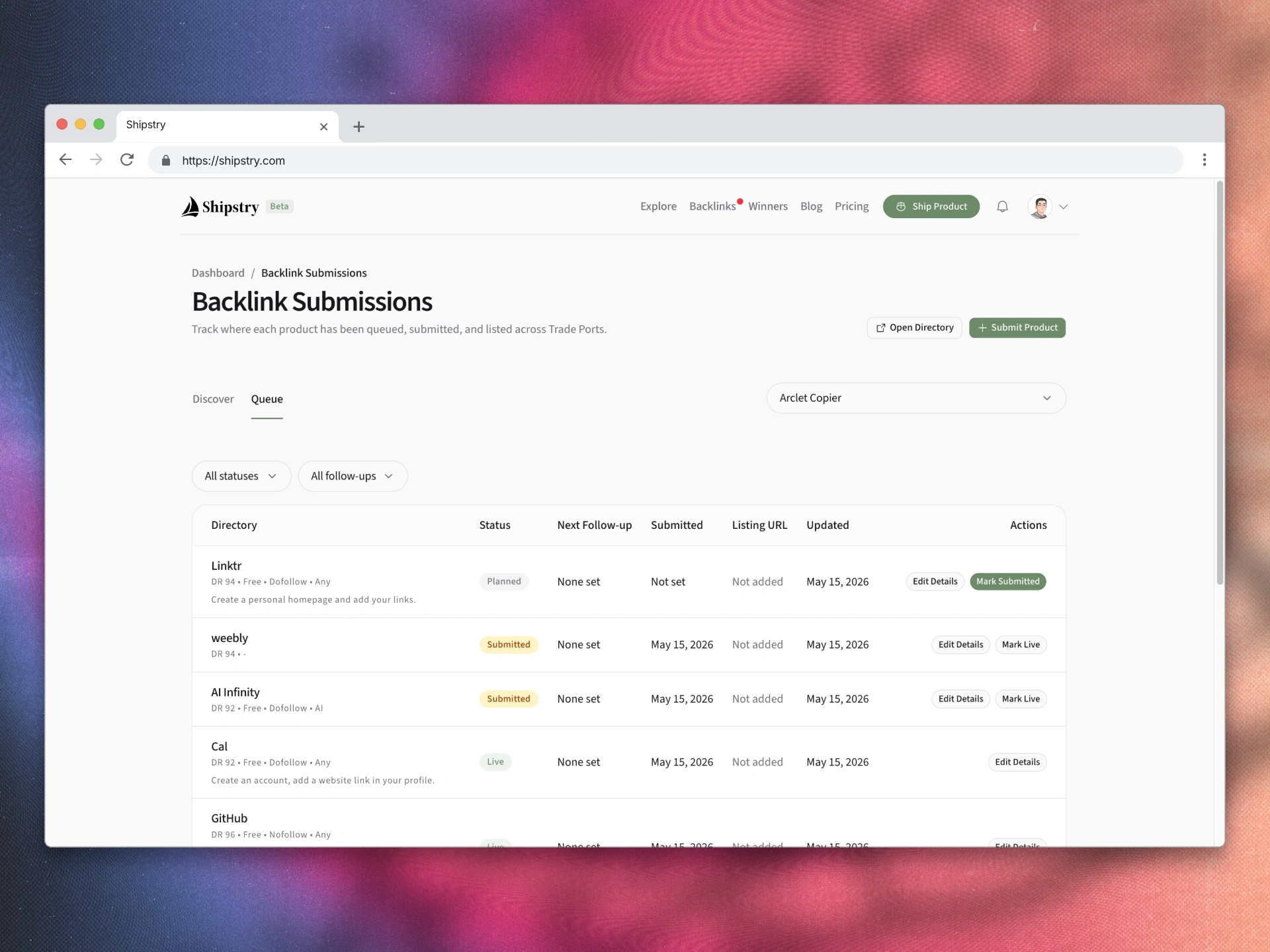
Queue shows only the directories you have started for the selected product. It is the working list, not another directory browser.
Each row can move through five states:
Plannedfor a directory you intend to submit toSubmittedafter you have sent the form or applicationLiveonce the listing is publishedRejectedwhen the directory says noSkippedwhen you decide it is not worth continuing
You can also keep the practical details beside the row: a note, the submission date, a listing URL, the date it went live, and the next follow-up date. A submitted entry with a due follow-up is called out in the queue, so it does not quietly disappear behind newer work.
There are quick actions for the common moves. Mark a planned directory as submitted. Mark a submitted directory as live. Open the details when the situation needs more context. That is intentionally boring. The point is to make the next honest action obvious, not to turn directory outreach into a dashboard game.
Your history should not vanish when a directory changes
Directories come and go. A site can close submissions, change its policy, or disappear after you have done the work.
Backlink Tracker keeps the record in your queue even if the source directory is later marked inactive. You can still see the name and URL captured with your submission, along with your notes and status. The row is marked as archived so you know the directory is no longer active, but the work does not get rewritten out of your history.
That is a small detail, but it matters when you return to a product months later and want to know what happened.
Who it is for
Use Backlink Tracker if you have a product on Shipstry, access to the Backlink Directory, and a list of submissions that is large enough to become hard to remember. It is especially useful when you are spreading outreach over a few weeks instead of trying to do everything on launch day.
It is probably unnecessary if you only plan to submit to one or two directories and do not need reminders or history. A note is fine for that. The tracker earns its place once the question changes from "where should I submit?" to "what did I do with the twelve places I shortlisted?"
Where to start
If you want to see the reviewed directories, what each entry contains, and how access works, start with the Backlink Directory. The public page also shows the tracker workflow before you buy access.
If you already have access and a product to work on, open Backlink Tracker, choose the product, and begin in Discover. Add only the directories you are genuinely prepared to submit to. Then let the Queue hold the details you would otherwise lose.
I built it because the useful part of a directory begins after you find a link.
If this article helped, leave a clap or join the discussion below.
Keep Reading
View all articlesLaunch Your Product This Week
View all launchesProducts shipping this week on Shipstry. Vote for your favorites and help makers get discovered.


Comments
Questions, pushback, and additions are welcome.