

Introducing Backlink Submissions
Why I turned Shipstry's backlink directory into a product-scoped submission workflow, so makers can track outreach, follow-ups, and live listings without going back to spreadsheets.

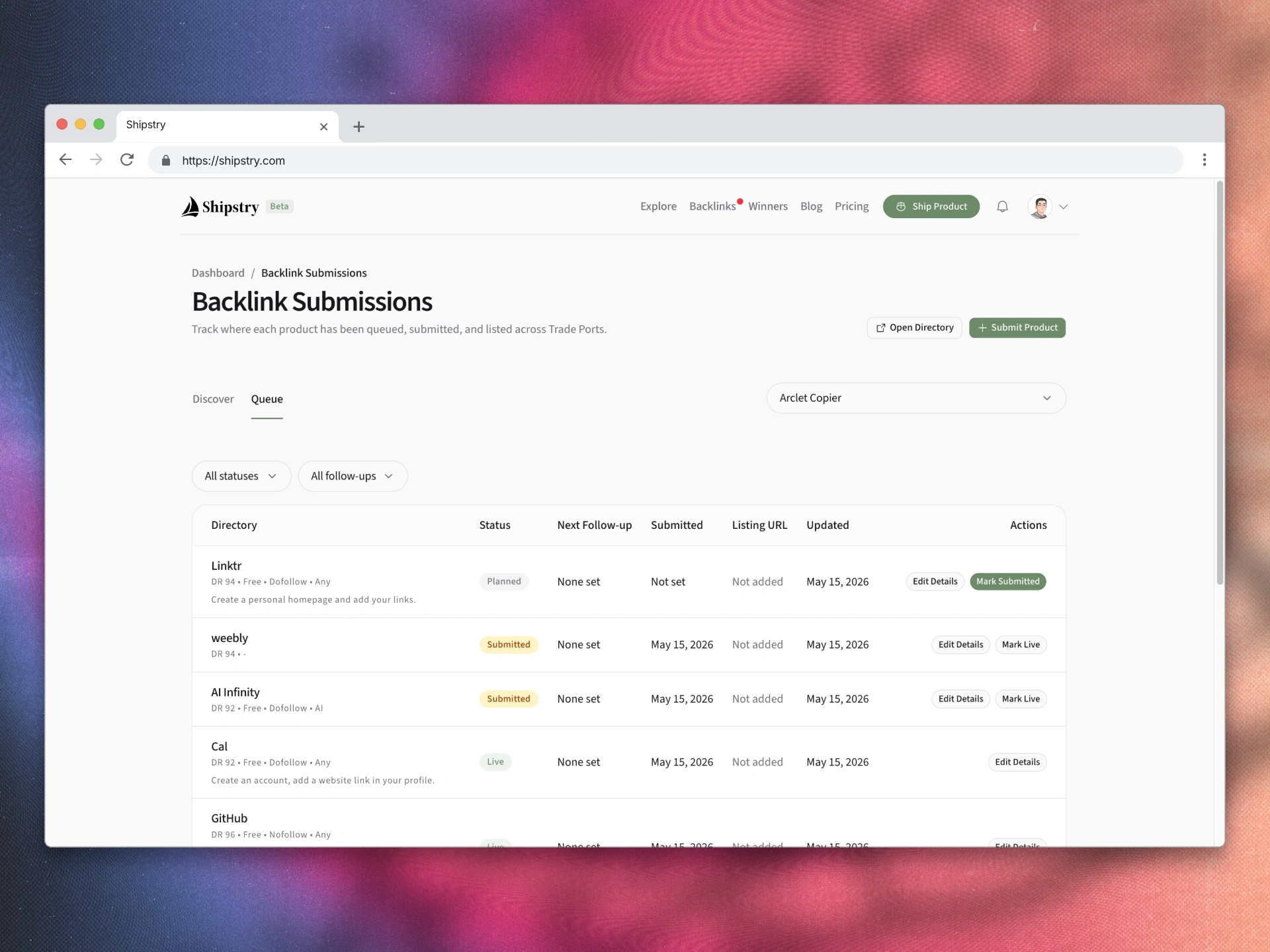
Shipstry's backlink directory solved the research problem.
It saved makers from digging through stale SEO listicles, half-dead directories, and random "submit your startup" pages that nobody had checked in months.
But once someone unlocked the directory and started using it seriously, the workflow immediately left Shipstry.
The research stayed in one tab. The actual progress tracking moved into a spreadsheet, a Notion table, or a scratch doc.
That gap is what Backlink Submissions is for.
The problem was no longer discovery
People were not getting stuck on "where can I submit?"
They were getting stuck on a different set of questions:
- which directories have I already queued for this product?
- which ones did I submit last week?
- which ones are live now?
- which ones need a follow-up?
- where did I save the listing URL?
Those are workflow questions, not directory questions.
And a public page like /backlinks is the wrong place to answer them. That page should stay simple: browse the directory, compare options, unlock access. It should not turn into a cramped product dashboard.
So instead of making /backlinks busier, I split the workflow in two: discovery on the public page, management in a private workspace.
What Backlink Submissions does
Backlink Submissions lives at /dashboard/backlink-submissions.
It is product-scoped and, for this first version, tied to submitted products in your dashboard.
The workspace has two tabs:
- Discover: browse the full directory in the context of one product, see each row's current state, and add directories to your queue.
- Queue: see only the directories you have already touched, then update status, save notes, set follow-ups, and keep track of live listings.
That split matters because those are two different jobs. One is deciding where to spend time. The other is keeping work in motion.
I kept the first version intentionally narrow
I did not want to ship a backlink dashboard full of analytics before the core workflow was useful.
So the first version stays small:
- simple statuses:
Planned,Submitted,Live,Rejected,Skipped - practical context: notes, listing URL, dates, follow-ups
- quick actions for moving a row forward without extra setup
The goal was not to build dashboard theater. It was to remove the need for a spreadsheet.
I also wanted the history to hold up over time. If a directory later goes inactive, your tracked row stays in the queue. A workflow tool should preserve what you already did, not erase it because the source list changed.
Why this matters
Before this, Shipstry had a curated backlinks directory.
Now it has the start of an actual submission workflow.
That is the missing piece.
The public directory still handles discovery. But once someone is doing the work, Shipstry no longer drops them back into manual tracking.
If you already have access
Open Backlink Submissions and pick a product.
Start in Discover if you are still choosing targets.
Switch to Queue if you already have submissions in motion.
If you have not unlocked the directory yet, start with Trade Ports.
If this article helped, leave a clap or join the discussion below.
Comments
Questions, pushback, and additions are welcome.